

This week, we're shipping one major feature every day. The theme: assistant-ui everywhere.
For two years, assistant-ui has been the go-to library for building AI chat on the web. Starting this week, that changes. Same runtime, same adapters, same developer experience — now on every platform your users are.
Day 1 — React Native
Build AI chat for iOS and Android.
We're launching @assistant-ui/react-native — native React Native bindings that bring the full assistant-ui experience to mobile.
Everything you know from the web version carries over:
- Same runtime, same adapters. Your
ChatModelAdapter, AI SDK integration, or LangGraph setup works out of the box. No rewrites. - Native primitives.
View,Pressable,Text,FlatList— not web views, not wrappers. Real native components. - Full feature set. Streaming, tool calls, message branching, thread management, attachments — all there.
Get started in one command:
npx assistant-ui@latest create --example with-expo my-chat-appOr add it to an existing Expo project:
npx expo install @assistant-ui/react-native @assistant-ui/react-ai-sdkThe API mirrors the web version closely. If you've built with @assistant-ui/react, you already know how to use it.
Day 2 — React Ink (Terminal UI)
Build AI chat for the terminal.
We're launching @assistant-ui/react-ink — terminal UI bindings powered by Ink, the React renderer for CLIs.
Build rich, interactive AI chat interfaces that run in any terminal:
- Composable primitives.
ThreadRoot,ComposerInput,MessageContent— the same component model, adapted for the terminal. - Markdown rendering. Ship with
@assistant-ui/react-ink-markdownfor formatted headings, code blocks with syntax highlighting, tables, and lists — all in your terminal. - Code diff rendering. Built-in
DiffViewcomponent and composableDiffPrimitivecomponents for displaying code diffs with syntax highlighting, line numbers, and context folding. - Tool calls with live feedback. Built-in
ToolFallbackcomponent shows spinners and formatted JSON output while tools execute. - Shared backend. Same adapters, same runtime core. Switch platforms without touching your backend code.
Get started:
npx assistant-ui@latest create --ink my-chat-appDay 3 — Assistant Cloud Redesign
A new dashboard for managing your AI assistants at scale.
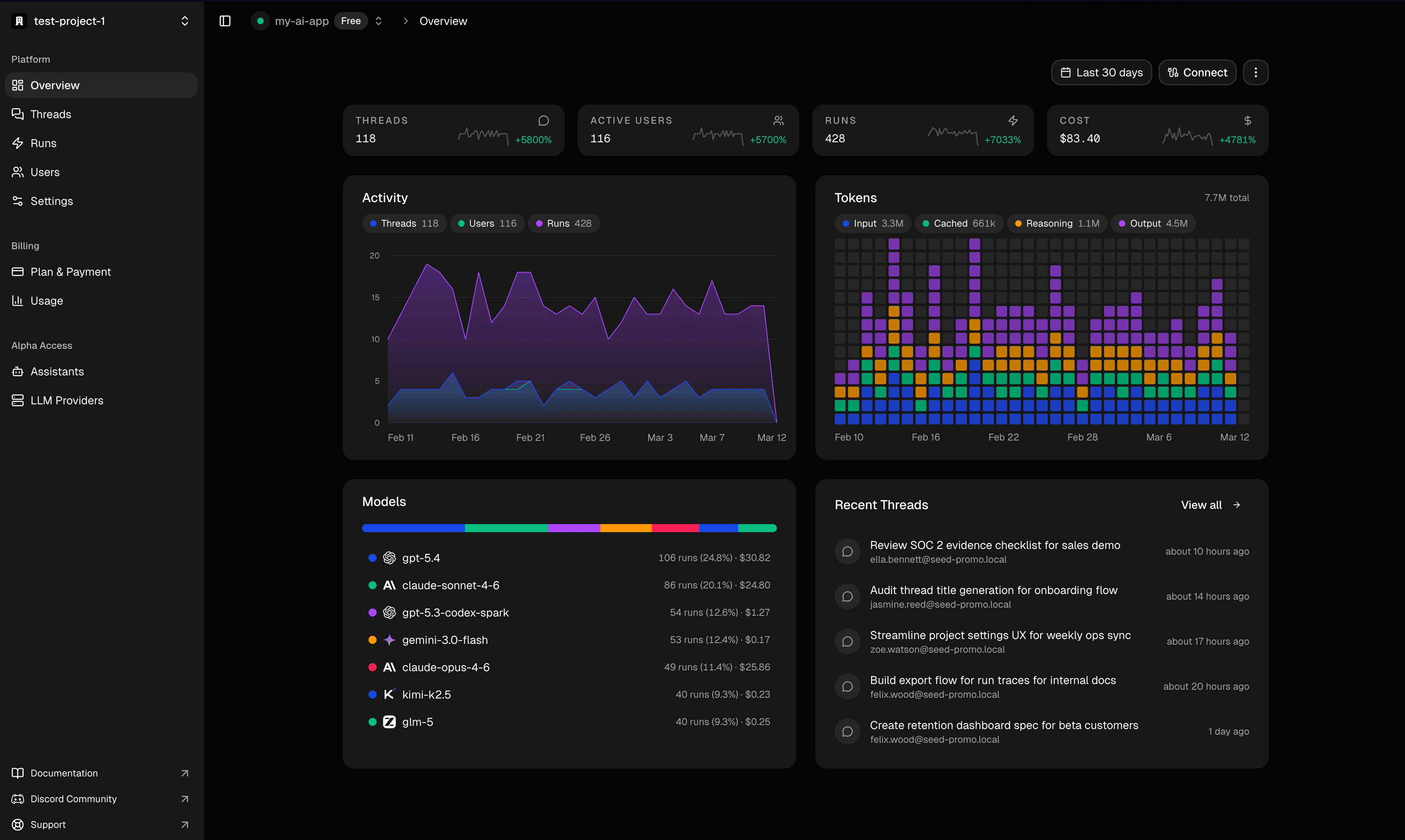
We've completely redesigned Assistant Cloud, the hosted backend for assistant-ui. Thread persistence, analytics, user management, and more, all in one place.
What is Assistant Cloud?
Assistant Cloud gives your assistant-ui app a production-ready backend. Drop in a few lines of config and get:
- Thread persistence. Conversations survive page refreshes. Users can pick up where they left off.
- Thread list. A ChatGPT-style sidebar, powered by your data — no extra backend work.
- Auto-generated titles. Every thread gets a title, automatically.
- User authorization. Works with Clerk, Auth0, Supabase, Firebase, or anonymous mode for demos.
What's new in the redesign
The new dashboard at cloud.assistant-ui.com is a full control center for your AI deployments:
- Analytics dashboard. Total cost, token usage, run count, average duration — with model distribution charts and usage trends over time.
- Thread browser. Search and inspect every conversation. View full message history, metadata, and timestamps.
- User analytics. Per-user metrics: runs, threads created, tokens consumed, costs incurred.
- Run tracking. Every LLM invocation logged with model, provider, cost, input/output tokens, cached tokens, reasoning tokens, and duration.
- Assistant configuration. Create multiple assistants with different models, system prompts, temperature, and top-p settings.
- LLM provider management. Configure OpenAI, Anthropic, Google, and other providers — with encrypted credential storage.
- API key management. Generate, track, and revoke project API keys.
- Auth rules. Configure JWT validation with JWKS URL, audience, and issuer settings.
Getting started
Add thread persistence to your existing assistant-ui app:
npx assistant-ui@latest cloudOr integrate directly with the AI SDK using useCloudChat:
npm install @assistant-ui/cloud-ai-sdk @ai-sdk/react aiWorks with any assistant-ui runtime — AI SDK, LangGraph, or custom backends. No migration required.
Day 4 — tw-shimmer
Beautiful shimmer effects for Tailwind CSS v4. Zero dependencies, pure CSS.
We're launching tw-shimmer — a Tailwind CSS v4 plugin that adds polished shimmer animations for both text and skeleton loaders. No JavaScript runtime, no dependencies — just add a class and go.
- Sine-eased gradients. 17 carefully calculated gradient stops following a sine ease-in-out curve. No banding, no harsh edges — just smooth, organic highlights.
- OKLCH color mixing. Perceptually uniform color transitions that look great in any color scheme.
- Text + Background. Shimmer text labels or skeleton placeholders with the same API.
- Auto-sizing. CSS container queries automatically derive speed and spread from container width — no JavaScript measurement needed.
- Fully customizable. Speed, spread, angle, color, duration, and repeat delay — all controllable via Tailwind utilities or CSS variables.
Install and add to your CSS:
npm install tw-shimmer@import "tailwindcss";
@import "tw-shimmer";Then use it:
<!-- Text shimmer -->
<span class="shimmer text-foreground/60">Loading...</span>

<!-- Skeleton loader -->
<div class="shimmer-container flex gap-3">
  <div class="shimmer-bg bg-muted size-12 rounded-full" />
  <div class="flex-1 space-y-2">
    <div class="shimmer-bg bg-muted h-4 w-1/4 rounded" />
    <div class="shimmer-bg bg-muted h-4 w-full rounded" />
  </div>
</div>Day 5 — Cloud AI SDK
Add cloud persistence to any AI SDK app. Just change your import.
We're launching @assistant-ui/cloud-ai-sdk — a standalone package that adds full thread persistence and management to any Vercel AI SDK application with a single hook change. No providers, no context, no runtime objects.
Before
import { useChat } from "@ai-sdk/react";

const { messages, sendMessage } = useChat();
After
import { useCloudChat } from "@assistant-ui/cloud-ai-sdk";

const { messages, sendMessage, threads } = useCloudChat();
That's it. One import change gives you:
- Automatic thread creation. Threads are created on the first message — no manual setup.
- Full message persistence. Conversations survive page refreshes. Users pick up where they left off.
- Built-in thread list.
threads.threadsgives you a ChatGPT-style thread sidebar, sorted by recency. - Auto-generated titles. Every thread gets an AI-generated title after the first response.
- Zero config. Set one env var (
NEXT_PUBLIC_ASSISTANT_BASE_URL) and you're done. - Works with any UI. Keep your existing components —
useCloudChatreturns the same interface asuseChat.
The package exports just two hooks (useCloudChat and useThreads) and four types. It works independently of assistant-ui's runtime and primitives — any React UI works.
Get started:
npm install @assistant-ui/cloud-ai-sdk @ai-sdk/react aiDay 6 — Heat Graph
GitHub-style activity heatmaps for React. Headless, composable, fully customizable.
We're launching heat-graph — a set of Radix-style compound components for building activity heatmap graphs. No styling opinions, no dependencies on charting libraries — just composable primitives you fully control.
- Radix-style composable.
Root,Grid,Cell,Legend,Tooltip— pick the pieces you need and compose them however you want. - Fully headless. Zero styling opinions. Every element is a plain div you can style with CSS, Tailwind, or any framework.
- Tooltip built-in. Hover tooltips powered by Radix Popper for pixel-perfect positioning, no extra deps.
- Custom bucketing. Plug in your own classification function to control how counts map to color levels.
- Localizable. Month and day labels expose raw values — format with the included English helpers or
Intl.DateTimeFormatfor any locale.
Install it:
npm install heat-graphOr add it via shadcn:
npx shadcn@latest add https://r.assistant-ui.com/heat-graphOne runtime, every platform
The big picture: assistant-ui is now a universal AI chat framework. Web, mobile, terminal — one codebase for your backend, one set of adapters, one way to register tools. The only thing that changes is the UI layer.
@assistant-ui/react          → Web (React + Radix UI)
@assistant-ui/react-native   → Mobile (React Native)
@assistant-ui/react-ink      → Terminal (Ink)
We'll be updating this post throughout the week as we ship new announcements. Follow @assistant-ui for daily updates or join our Discord for early access.